Unlock Efficiency: Kitchen Display System Software Guide
Key Takeaways
- A useful KDS creates one production queue across dine-in, online, delivery, and phone-originated orders.
- Station routing, modifiers, timers, and expo status should reduce decisions and verbal relays during the rush.
- Evaluate integrations, failure fallbacks, screen placement, support ownership, and total cost in the restaurant's real operating environment.
- Roll out by station or daypart, train by role, run a short parallel workflow when needed, and assign one owner for routing accuracy.
Why does kitchen display system software matter during a rush?
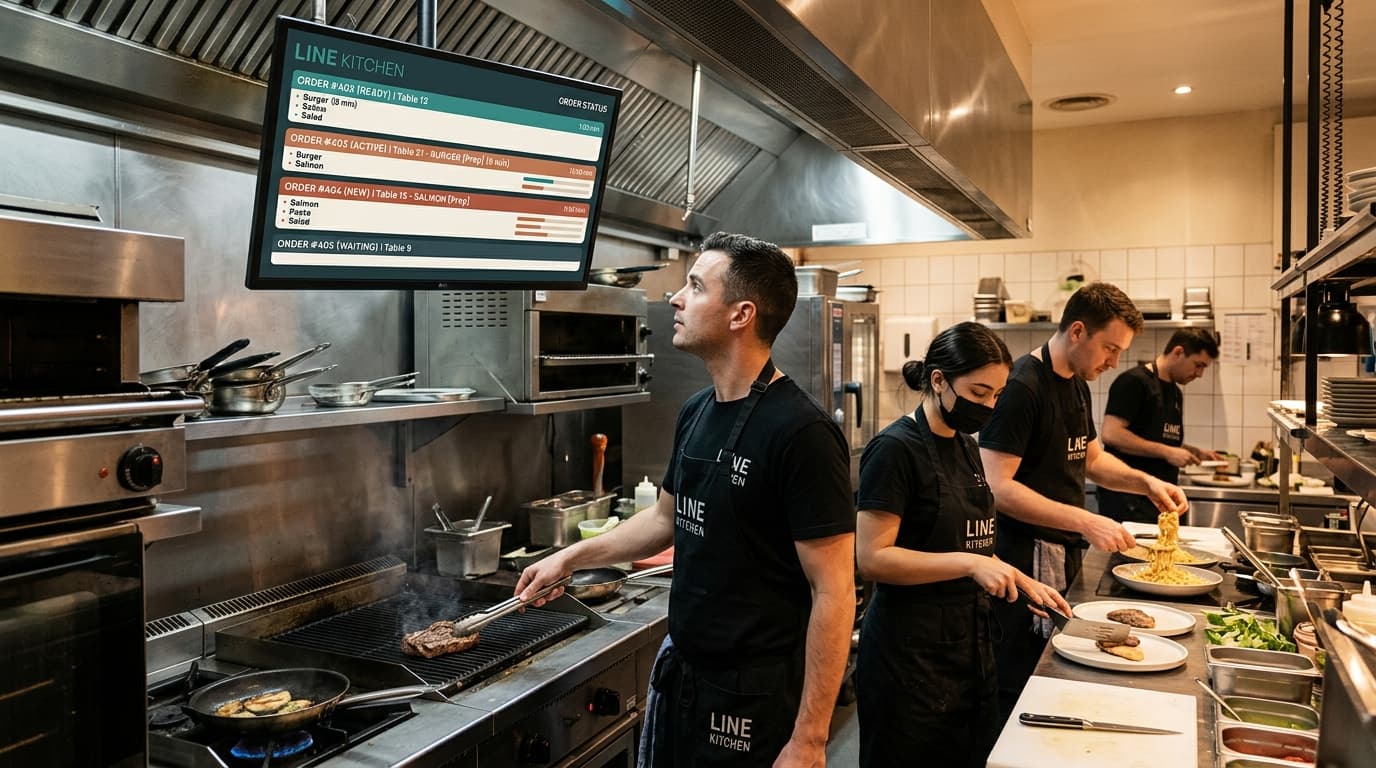
The dinner rush doesn't fall apart because cooks suddenly forget how to cook. It falls apart because orders arrive from too many places, in too many formats, at the wrong moments. A server rings in a table. A delivery tablet chirps. A phone order gets scribbled on paper. A printer jams. Someone asks whether the burger is no onion or extra onion. Expo is waiting on fries that never fired. The guest sees delay. The kitchen feels blame.
That's the environment where kitchen display system software stops being a nice upgrade and starts acting like operational infrastructure.
In older setups, each new channel adds friction. Dine-in, online ordering, delivery apps, and phone orders all create separate streams of work. Staff spend too much time translating, repeating, and chasing status instead of producing food. The kitchen isn't slow because the team lacks effort. The system is forcing people to coordinate manually under pressure.
A good KDS changes that. It gives the kitchen one working view of reality, one place where orders appear, move, and finish in an organized way. For operators trying to modernize the kitchen without adding more chaos, that shift matters far more than the usual sales pitch about “going paperless.”
The End of Paper Ticket Chaos
Saturday at peak volume exposes every weakness in a restaurant's process. Paper tickets stack up. One curls near the grill. Another gets smudged by sauce. A third prints late because the machine hesitated just long enough to create doubt. Front of house thinks the order is in. Back of house thinks it never arrived. Nobody is lying. The system is.
Paper also forces constant translation. A cook scans shorthand. Expo listens for shouted updates. Someone manually sorts what belongs to fry, grill, pantry, and dessert. That might work when volume is light and the same veteran crew is on the line. It breaks when orders hit from multiple channels at once.
Where paper usually fails first
The first crack is rarely speed. It's coordination.
- Orders split badly: One part of the meal starts while another part is still sitting in a printer queue.
- Modifiers get buried: Allergy notes, side swaps, and add-ons become easy to miss in a cluttered ticket rail.
- Expo loses visibility: Staff know what their own station is doing, but nobody sees the whole order clearly.
- Phone and third-party orders feel separate: The kitchen ends up managing channels instead of managing production.
Paper doesn't create discipline. It depends on it.
That distinction matters. A disciplined team can survive on printers. But survival isn't the same as control, and it isn't the same as profitability. Every remake, missed modifier, or late handoff adds labor friction and guest friction at the same time.
Why operators outgrow the printer rail
The core issue isn't that paper is old. It's that paper can't function as a central control layer for a multi-channel restaurant.
A modern operation needs the kitchen to respond to demand as one stream of work, not five disconnected ones. It needs an order to arrive legibly, route correctly, and stay visible until the entire meal is ready. It needs less shouting, less guessing, and fewer hand-carried clarifications between front and back of house.
That's why the best operators don't evaluate a KDS as a screen replacement. They evaluate it as a way to restore calm to service.
How a KDS Transforms Your Kitchen Workflow
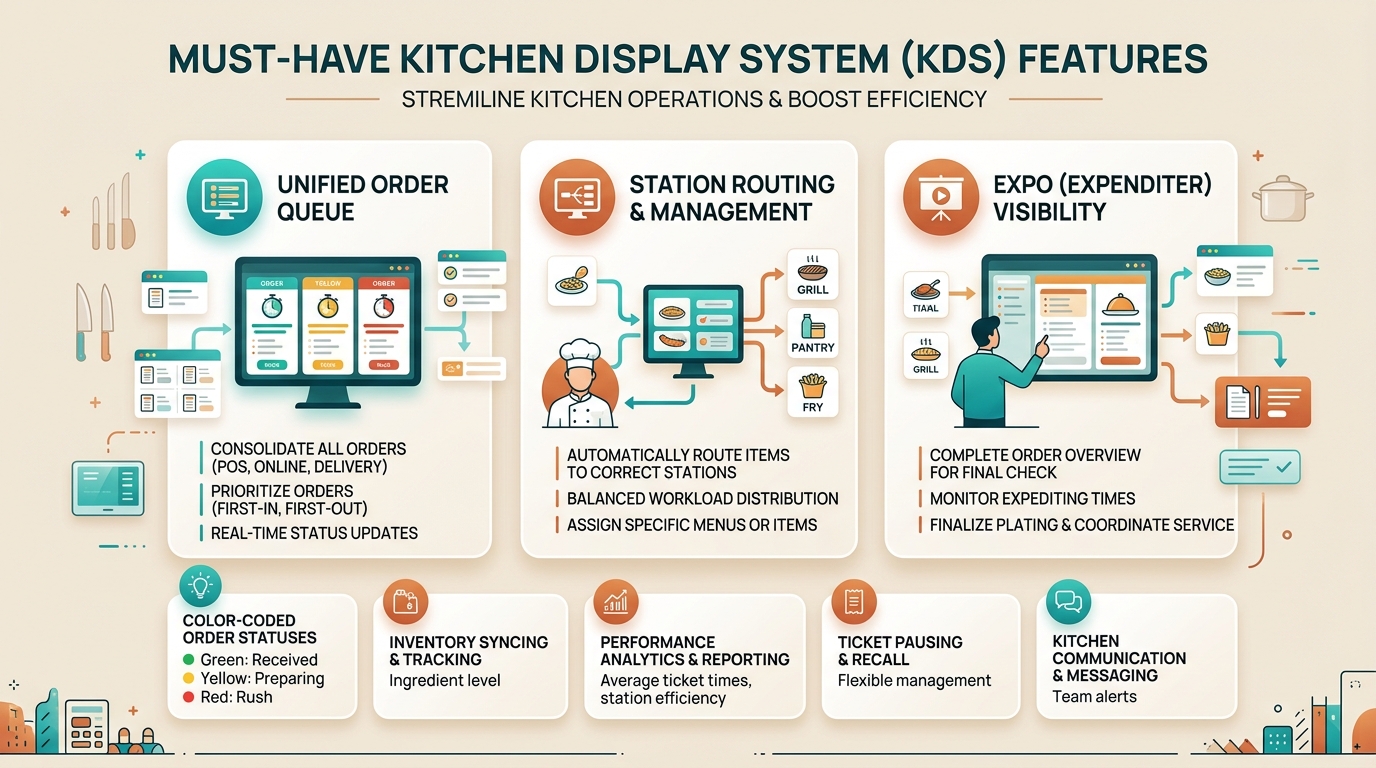
A strong KDS works like air traffic control for the kitchen. Orders come in from different origins, but they don't land wherever they want. The system directs each item to the right station, in the right sequence, with a shared understanding of what's happening across the line.
How the order flow should work
Oracle describes modern KDS behavior as item-by-item station routing with direct transmission from front of house to kitchen, so each order line goes to the correct prep station in real time and item completion can be synchronized before the full ticket is expedited together. That design reduces coordination delays and lowers the chance of incomplete firing or mis-timed courses, as outlined in Oracle Simphony kitchen display system documentation.
In practical terms, that means a burger can appear on grill, fries can appear on fry, salad can appear on pantry, and expo can track when all components are ready to move together. Staff don't need to decode one long ticket and decide what applies to them. The system has already done that sorting.
What changes on the line
When routing is configured well, the kitchen feels different almost immediately.
- Each station sees relevant work only. Grill isn't distracted by dessert. Pantry isn't scanning steak temps.
- Modifiers stay attached to the item. Special instructions travel with the dish instead of living in someone's memory.
- Expo gets timing, not just completion. The team can spot what's lagging before the guest feels it.
- Front and back of house stop relaying routine updates verbally. The screen becomes the shared source of truth.
That last point matters for staffing pressure. Restaurants dealing with turnover and training gaps need systems that reduce dependence on perfect communication. Operators exploring broader labor support often end up thinking about phone handling and kitchen flow together, because both problems show up during rush periods. That's the same pressure behind tools discussed in this guide to restaurant labor shortage solutions.
Practical rule: If a KDS still forces cooks to ask, “Is this mine?” or expo to ask, “Did anyone fire this?”, the workflow hasn't actually been fixed.
A KDS doesn't make a weak kitchen strong by itself. It does something more useful. It removes preventable confusion so the team can work at its real capacity.
Core Features Every Modern KDS Must Have
A kitchen display system earns its keep when the line is under pressure. Friday dinner. Third-party orders stacking up. A phone order just came in through AI. The host stand is quoting one pickup time, the delivery tablet says another, and the grill cook wants to know what fires first. In that moment, a good KDS is not just a screen. It is the operating system for the kitchen.
Core capabilities
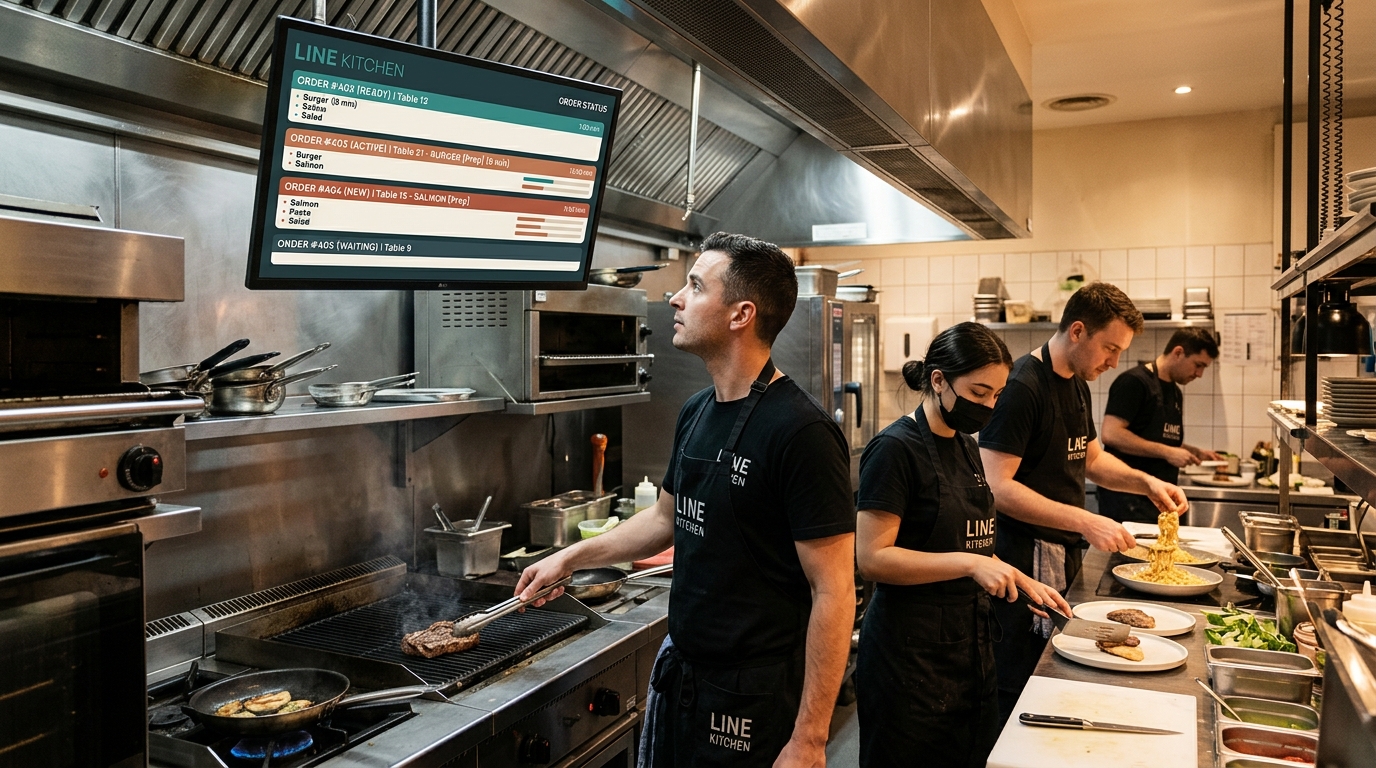
The baseline is simple. A modern KDS has to reduce confusion across every order channel, not just replace paper with glass.
| Feature | Why it matters in service |
|---|---|
| Clear digital ticket display | Keeps modifiers readable, cuts misreads, and makes high-volume screens usable during a rush |
| Station-based routing | Sends each item to the right station so the kitchen works by responsibility, not guesswork |
| Timers and aging visibility | Shows which tickets are drifting before the delay turns into a remake, comp, or bad handoff |
| Expo or completion view | Gives expo a reliable picture of what is ready, what is waiting, and what cannot leave yet |
| Channel awareness | Flags dine-in, pickup, delivery, and phone orders so the team stages and prioritizes correctly |
If any of those are missing, the staff usually fills the gap by shouting updates, memorizing special instructions, or building workarounds that break under volume.
The stronger systems go one step further. They keep the kitchen aligned even when orders arrive from the POS, the website, delivery apps, and voice ordering tools at the same time. That is why operators comparing options should look closely at a live KDS integration setup for multi-channel restaurant orders, not just the screen layout.
What separates a usable KDS from one that actually improves operations
Good systems display orders. Better systems help the kitchen make fewer low-value decisions.
- Prioritization logic: The queue should reflect promised times, hold times, and firing logic instead of showing every ticket as equally urgent.
- Allergen and recipe visibility: This reduces avoidable mistakes and helps newer cooks execute without stopping the line for constant clarification.
- Production reporting: Managers need to see repeat slow points by station, daypart, and order channel.
- Load management: The system should support throttling, pacing, or prep-aware sequencing when incoming volume outruns kitchen capacity.
Those features matter more in restaurants with a mixed sales channel model. A dine-in ticket and a delivery order may hit the kitchen at the same minute, but they do not carry the same timing risk. Add phone AI ordering into that mix and the KDS has to act like a traffic controller, not a passive display.
Speed and paper reduction are only part of the evaluation. Operators also need to consider setup time, reliability, hardware fit, and whether the system can hold up when orders arrive from several channels at once. The National Restaurant Association's 2025 off-premises research reported that nearly three-quarters of restaurant traffic was off-premises and that mobile ordering was already mainstream. That makes channel coordination an operating requirement, not an edge case.
The best KDS reduces decisions cooks should not be making in the middle of a rush.
Features that depend on the concept
A coffee shop, ghost kitchen, food truck, and full-service restaurant should not buy the same feature set.
Some kitchens need course pacing. Some need pickup shelf status. Some need driver handoff cues or customer-facing order status screens. A high-volume takeout operation may care more about promised-time management than plated expo views. A full-service kitchen may care more about coursing and synchronization across stations.
A common mistake is buying for the demo instead of buying for the bottleneck. If the pain is channel chaos, choose the system that consolidates and prioritizes orders cleanly. If the pain is expo, choose the one that gives complete order visibility. If the pain is training and consistency, choose the one that keeps modifiers, allergens, and prep steps visible at the station level.
The Power of Integrations: From POS to Phone AI
A KDS becomes much more valuable when it stops acting like a kitchen monitor and starts acting like the command center for every order source.
For many restaurants, the POS was the original hub. That's still important, but it's no longer enough. Orders now come from the counter, server tablets, brand websites, delivery marketplaces, and phone calls. If those channels aren't integrated into one production workflow, the kitchen ends up doing manual reconciliation all day.
One queue beats channel juggling
A useful KDS goes beyond a passive digital ticket board. Oracle's Simphony documentation describes real-time order status, timers, performance data, and the controller that moves order information between the system and kitchen displays. Those capabilities are the foundation for a shared production queue, but operators still need to verify which order channels a specific product can accept directly.
That matters because “tablet hell” isn't really a tablet problem. It's a workflow fragmentation problem. The more separate inboxes a restaurant creates, the more often someone has to re-enter, re-check, or re-prioritize an order by hand.
Why phone orders are the hidden integration test
Phone traffic is where many restaurants still lose control. A staff member answers mid-rush, mishears a modifier, puts the caller on hold, or writes the order down to enter later. The kitchen gets a delayed or incomplete version of the order. Front of house gets pulled away from guests. Nobody wins.
That's why phone-originated orders are a useful test of whether the restaurant's tech stack is modern. If a complex takeout order can come in by phone, appear correctly in the kitchen workflow, and move like any other order, the operation is starting to behave like a unified system. If phone orders still rely on manual relay, there's a weak point hiding in plain sight.
Operators evaluating that kind of setup should look closely at how live KDS integrations handle order handoff, status visibility, and channel consistency.
What integrated kitchens do better
Integrated kitchens usually gain control in three places
- Intake clarity: Orders arrive in one format instead of being translated from calls, scribbles, and separate devices.
- Production sequencing: The line can prioritize work based on the kitchen's actual queue, not whoever shouted first.
- Handoff confidence: Pickup and delivery staging become cleaner because the kitchen knows what is complete and what is still in progress.
A KDS with weak integrations still creates some improvement. A KDS with strong integrations changes the operating model. It gives the restaurant one production language across dine-in, digital, delivery, and phone channels.
How to Choose the Right Kitchen Display System
Friday at 7:15 p.m., the dining room is full, delivery tablets are chirping, and the phone keeps ringing. The wrong KDS will make that chaos easier to see. The right one will help the kitchen control it.
That is the right standard for evaluating kitchen display system software. Pretty screens do not matter much if the system cannot handle the way orders enter the business. A modern kitchen is not fed by the POS alone. It is fed by dine-in, online ordering, third-party delivery, and, in many restaurants now, phone AI orders that need to land in the same production flow without a staff member re-entering anything.
Start with the operating model, not the demo
Buying mistakes usually happen in the gap between the vendor demo and real service.
In a demo, every order is clean, every station is connected, and every modifier shows up where it should. In service, the line is split across stations, one printer still needs to stay during transition, the network has weak spots, and expo needs a view that matches how the kitchen works. A KDS has to fit that environment.
The first question is simple: can this system act as the central control point for every order channel you run today, and the channels you are likely to add next?
If the answer is no, keep looking.
Price matters. Cost of ownership matters more.
The monthly software fee is the easy number. Operators also need to account for screens, mounts, protective enclosures, installation labor, training time, support responsiveness, network cleanup, and the cost of disruptions during rollout.
Hardware-agnostic systems can lower upfront spend and give the restaurant more choice. They can also leave the operator responsible for sourcing reliable equipment and sorting out support between multiple vendors. Bundled systems are often easier to install and support, but they can tie the restaurant to one ecosystem for years.
That trade-off is real. Some groups want flexibility. Others want fewer moving parts and one company to call when service is on the line.
Evaluate the messy reality of your store
Many restaurants are running a mixed environment, not a clean tech stack. They have older printers, a POS that cannot be replaced this quarter, tablets from different vendors, separate workflows for takeout and dine-in, and staff with very different comfort levels around technology.
Use that reality during evaluation. Ask the vendor to show how the KDS handles partial migration, mixed digital and paper workflows, and order routing across multiple channels. Ask what happens when a phone order from an AI answering system enters at the same time as a POS ticket and two marketplace orders. Ask where the source of truth lives, and who can fix routing when something breaks.
The National Restaurant Association's 2025 report found that off-premises orders accounted for nearly three-quarters of restaurant traffic. That matters here because a KDS decision is no longer just a kitchen hardware decision. It is an order-orchestration decision.
Questions worth asking before you sign
A short, uncomfortable conversation now is cheaper than six months of workarounds.
- Channel intake: Which order sources flow directly into the KDS without manual re-entry?
- POS fit: Does the current POS control routing, or does the KDS handle it?
- Phone AI support: Can phone orders from tools like TastyVox enter the production queue with the same item structure and modifiers as online and POS orders?
- Fallbacks: If one screen, station, or internet connection fails, what continues to work?
- Printer coexistence: Can one part of the kitchen stay on paper temporarily while the rest goes digital?
- Expo visibility: Can expo see status across all channels in one view?
- Support: Who answers during live service, and how fast can they access the system?
- Permissions: Can managers adjust routing, prep timing, and station settings without opening a support ticket?
Operator filter: If the vendor only shows the ideal workflow, they have not shown enough.
Match the system to the bottleneck that is costing money
A cafe with one line usually needs clarity and speed. A full-service kitchen needs pacing, coursing, and a clean expo view. A delivery-heavy concept needs one production queue that can absorb website orders, app orders, and phone orders without forcing the team to translate between systems. Multi-unit operators need consistency, permissions, and support that scales.
There is no single best kitchen display system for every restaurant. There is only the best fit for the failure point that keeps hurting service.
Use that lens
| If this is the pain | Prioritize this capability |
|---|---|
| Tickets get lost or modifiers are missed | Clear item display and modifier visibility |
| The line gets buried by orders from different channels | Unified queue management across POS, online, delivery, and phone |
| Stations work out of sequence | Strong routing and station-specific firing rules |
| Expo cannot trust completion status | Reliable order synchronization and finish-state visibility |
| Training new staff takes too long | Simple views and predictable bump flow |
| Managers spend too much time babysitting integrations | Stable channel integrations and clear support ownership |
The best KDS purchase does more than replace paper. It gives the kitchen one operating language. That is what restores control when the business is taking orders from everywhere at once.
Implementing Your KDS for a Smooth Rollout
A strong system can still fail if rollout is sloppy. Most problems blamed on the software are setup problems, training problems, or timing problems. Restaurants don't need a dramatic launch. They need a controlled one.
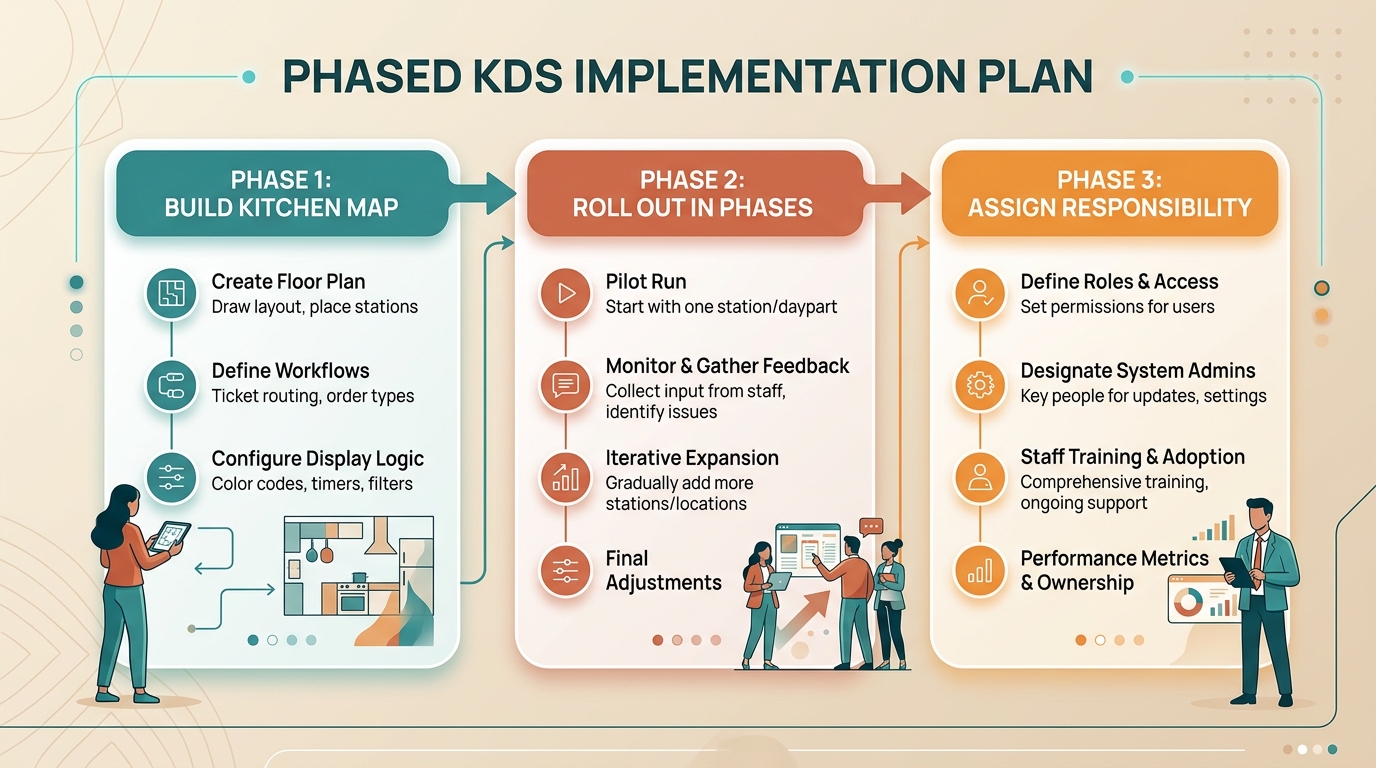
Build the kitchen map before touching settings
Start with the physical line, not the software menu. Identify each prep station, what items belong there, who finishes what, and where expo needs visibility. Then translate that into routing rules and screen placement.
Hardware choices matter here. According to a technical buyers guide, commercial KDS deployments commonly use Ethernet (RJ45 10/100/1000 Mbps) or Wi-Fi 802.11ac or better, with 1080p as the baseline for 15-inch-and-larger displays, and they're expected to operate 12 to 16 hours daily in hot, greasy, moisture-prone environments, as described in this KDS hardware buyers guide. In plain language, the screen has to be readable and the network has to stay stable when the kitchen is under stress.
Roll out in phases
A phased launch is safer than a full flip.
- Choose one station first. Start where routing benefits are obvious and menu complexity is manageable.
- Run paper in parallel briefly if needed. This reduces panic while staff build trust in the screen.
- Train by role. Cooks, expo, and front of house need different workflows, not one generic walkthrough.
- Adjust after live shifts. Ticket view, bump timing, and routing often need tuning once the line uses them in real service.
A Friday night is the wrong time to discover the pantry station can't read the modifier font from six feet away.
Assign responsibility clearly
Someone on the team should own KDS accuracy. Not forever, but during rollout. That person checks menu mapping, verifies station routing, confirms updates after menu changes, and becomes the first internal point of contact when something looks off.
The restaurants that adopt quickly usually do one thing well. They make the KDS part of daily operations instead of treating it like a side device. Once the team sees that the screen reflects reality consistently, resistance drops fast.
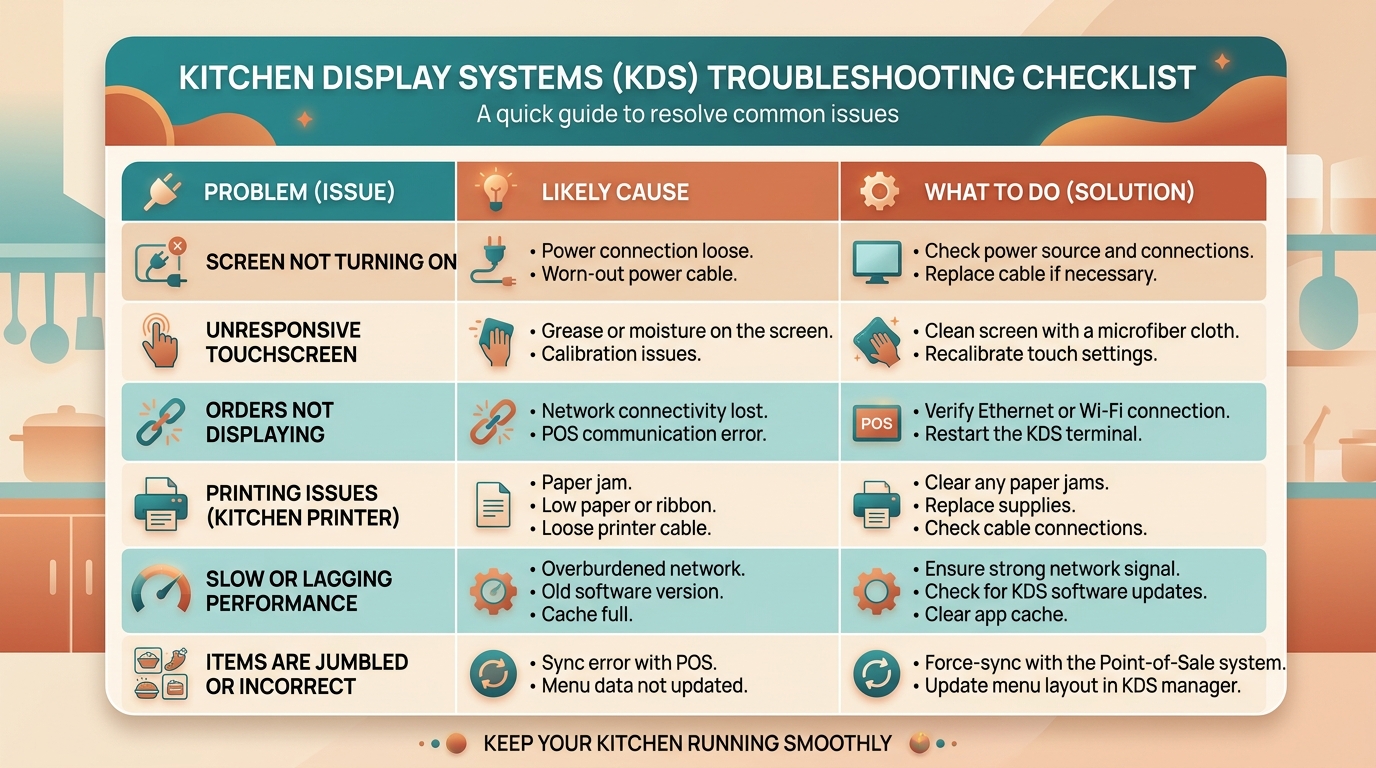
An Operator's KDS Troubleshooting Checklist
Even a good setup will hit rough moments. The useful question isn't whether issues happen. It's whether the team can diagnose them quickly without turning the line upside down.
Quick troubleshooting table
| Problem | Likely cause | What to do |
|---|---|---|
| Tickets aren't appearing | Lost connection between order source and KDS, or routing rules are incomplete | Check whether the order entered the POS or source channel correctly, then verify station mapping |
| One station sees the wrong items | Menu categories or item routing were configured incorrectly | Audit item assignments and test with a few common orders |
| Screen is visible but hard to use | Display size, resolution, angle, or placement is wrong for the station | Reposition the screen, review brightness, and confirm the hardware suits the environment |
| Cook times feel inaccurate | Prep assumptions don't match real kitchen behavior | Update item timing rules based on actual line performance |
| Expo says orders are incomplete | Completion flow isn't being used consistently across stations | Retrain staff on bump rules and verify everyone follows the same closeout process |
A calm kitchen starts before food hits the line. TastyVox helps restaurants capture phone orders, answer common questions, and route rush-hour demand without tying up staff on the handset. For operators who want cleaner phone intake and a more reliable path from caller to kitchen, it's a practical next step.
How this was researched
Oracle's official Simphony documentation supports the descriptions of digital tickets, timers, station displays, expo visibility, reporting, and order routing. National Restaurant Association research supports the continuing operational importance of off-premises demand. The hardware specifications are clearly attributed to a vendor-authored buyer's guide and should be treated as evaluation criteria, not universal requirements.
Want to hear what this sounds like in practice?
Listen to a demo call with a real restaurant menu. No commitment, no sales pitch.
Frequently asked questions
Is kitchen display system software always better than printers?
Not in every kitchen, but a KDS is usually more useful when several order channels and stations need shared status, routing, modifiers, and timing. A simple operation may still keep printers as a primary or backup workflow.
Can a restaurant keep printers during a KDS transition?
Often, yes. A phased rollout can keep paper at selected stations while the team validates digital routing, screen placement, bump rules, and fallback procedures.
What matters more in a KDS, software or hardware?
Both matter. Routing and timing logic must fit the kitchen, while screens, mounts, networking, and controls must remain readable and reliable in the heat and pace of service.
Can a small independent restaurant benefit from a KDS?
Yes, when the restaurant has genuine workflow friction such as missed modifiers, several order channels, unclear station ownership, or unreliable completion status. Fit depends more on complexity than location count.
How should a restaurant train staff on a new KDS?
Train cooks, expo, managers, and front-of-house staff on the actions each role owns. Pilot live orders, document bump and recall rules, and revise routing after observing real shifts.
See how TastyVox sounds with your menu.
Book a 20-minute call and we'll walk through how it works for your specific restaurant.