
Restaurant Voice AI Integrations: POS, KDS, Reservations, and the Source of Truth
Key Takeaways
- A logo is not an integration specification. Ask what data is read, what actions are written, how often information updates, and what happens when the connection fails.
- Choose a source of truth for each operating domain. Menus, orders, reservations, wait times, and guest policies may belong to different systems.
- Read access and write access solve different problems. Reading a menu does not prove that an order can be created, routed, paid, changed, or cancelled correctly.
- A standalone KDS workflow can be a valid launch path. It should be described honestly as a separate operating workflow, not disguised as native POS integration.
- Test exceptions, not only happy paths. Sold-out items, duplicate submissions, unavailable reservation slots, and connection failures reveal whether the workflow is safe.
What should restaurant voice AI actually connect to?
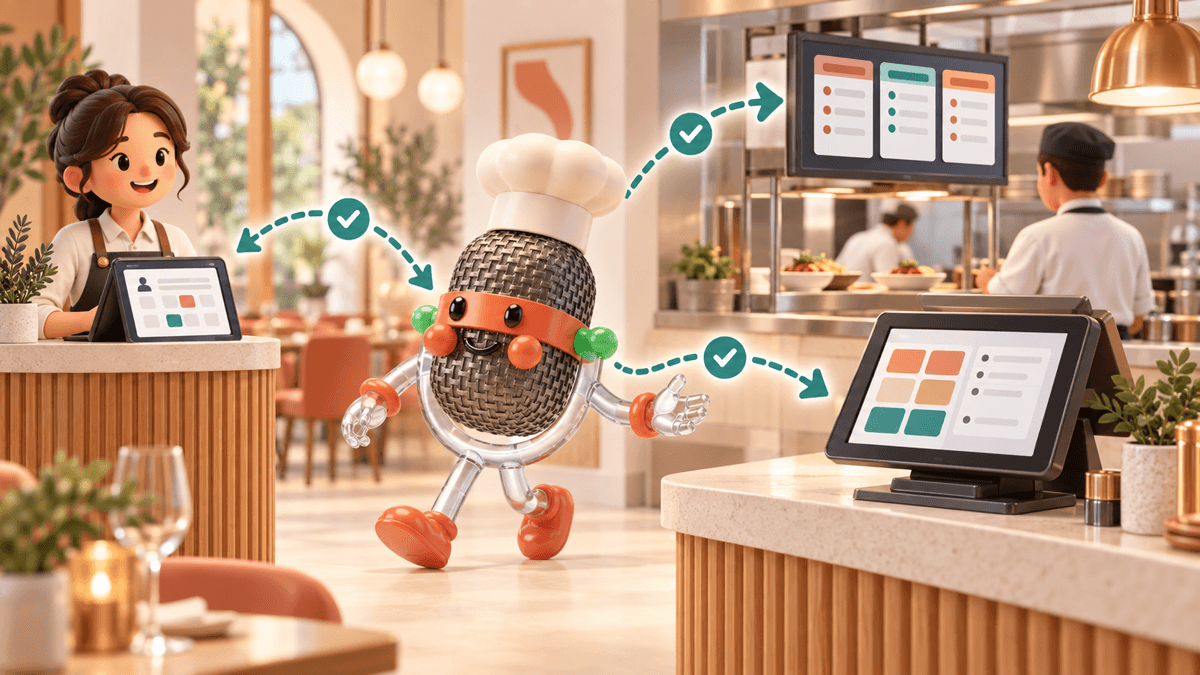
A restaurant voice agent can sound excellent and still create work for the team. The caller orders a large pizza with half mushrooms, adds a side, and asks for pickup at 7:15. The conversation is only the first half of the job. The menu must be current, every modifier must map correctly, the price must be valid, the order must reach the right production queue, and the restaurant must know whether the handoff succeeded.
That is why restaurant voice AI integrations matter. Voice is the interface the guest hears. The integration determines whether the restaurant can trust what happens next.
At TastyVox, we build voice AI for restaurants, so we have a commercial interest in this category. This guide is not a claim that every restaurant needs the deepest possible integration. It is a framework for deciding which data and actions your venue needs, what can launch safely as a standalone workflow, and what a vendor should demonstrate before you rely on it during service.
What does “integrated” mean for restaurant voice AI?
An integration is a defined exchange of data or actions between the voice system and another operating system. It should answer four questions: what moves, in which direction, how quickly, and what happens if it does not arrive.
The word covers several very different arrangements
| Integration level | What the voice system can do | What it does not prove |
|---|---|---|
| Reference-only configuration | Use an uploaded menu, website, spreadsheet, or approved knowledge base | That changes in the restaurant's system will appear automatically |
| Read connection | Retrieve selected menu, price, availability, hours, or reservation data | That the voice system can create or update an order or booking |
| Write connection | Send a structured order, reservation, note, or status change to another system | That later changes flow back to the voice system |
| Two-way workflow | Read current data, write an action, and receive status or change events | That every field, location, and exception is supported |
This is why an integrations page full of logos is only a starting point. “Works with Square” might mean a live catalog sync and structured order creation. It might mean a guided connector with limitations. It might mean that completed orders arrive on a separate tablet beside the Square terminal. Those can all be useful, but they are not the same product.
The operator question is not “Do you integrate with our POS?” It is “Show me the exact path for our menu, our order, our kitchen, and a failed connection.”
Where should the source of truth live?
A source of truth is the system the restaurant has authorized to provide the current answer for a specific type of information. It is not necessarily one database for the entire business.
The POS or menu platform may own item names, prices, modifier rules, taxes, dayparts, and sold-out status. The reservation platform may own table inventory and booking policies. The KDS may own production status. An operator-approved knowledge base may own parking directions, catering policies, and holiday hours.
The voice agent should know which system wins when two sources disagree. If the website says the lunch special costs $14 but the POS says $16, which value may the caller hear? If a spreadsheet says an item is available but the POS marks it sold out, should the order proceed? If the reservation book has no inventory, may the assistant promise a table based on a generic hours page?
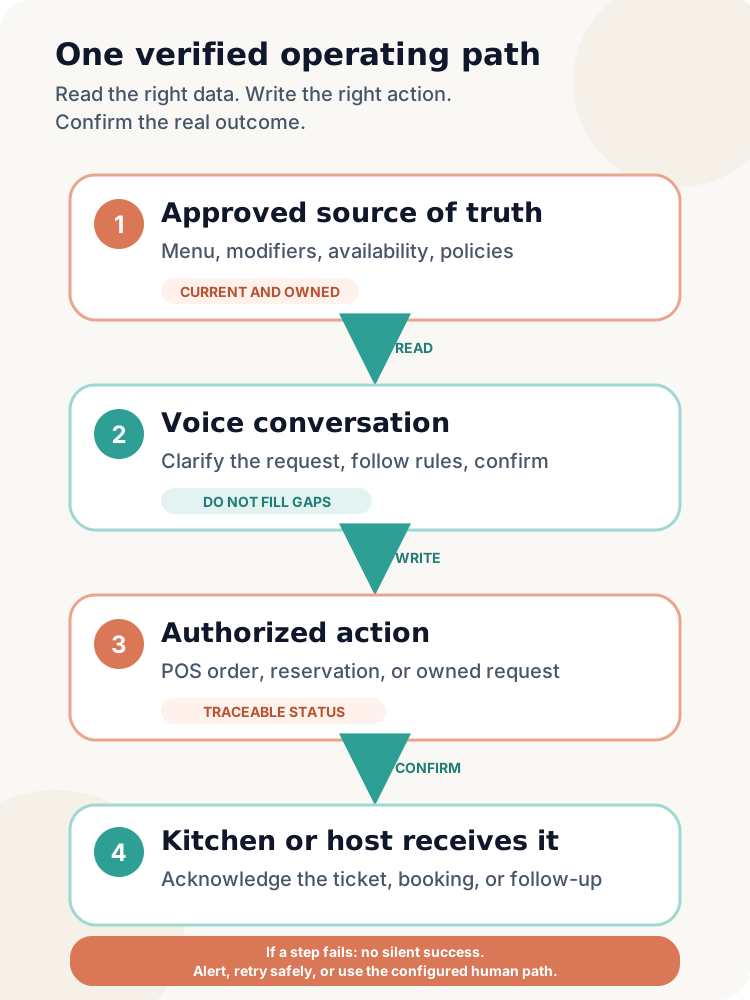
A clean design gives each data domain an owner
- Menu truth: items, prices, required modifiers, optional add-ons, availability, and daypart rules.
- Order truth: the confirmed cart, order identifier, payment state, promised time, and later changes.
- Reservation truth: available slots, party-size rules, deposits, seating options, and booking status.
- Service truth: kitchen or table status that is current enough to share with a caller.
- Policy truth: answers approved by the restaurant, with an owner and review date.
Do not let the voice system quietly blend competing values. A confident answer from stale data is still wrong.
What should a POS integration do for a phone order?
A useful POS workflow has a read side and a write side. On the read side, the voice agent needs the menu structure that applies to the caller's location and ordering channel. On the write side, it needs a safe way to create the intended order without losing modifiers, duplicating the ticket, or inventing a total.
Official platform documentation shows why this is more detailed than downloading a list of item names. Square's menu documentation describes categories, items, variations, modifier lists, location channels, availability updates, and separate kitchen-facing names. It also recommends validating relationships, prices, and required fields while monitoring sync errors. Toast's menu API guidance distinguishes menu visibility by ordering channel and directs ordering partners to the version designed for their use case.
For an operator, the technical detail becomes a practical test
- Does the agent receive only the menu available for this location and this channel?
- Are required modifier groups actually required during the call?
- Are price, tax, and discounts calculated by the authorized commerce system rather than improvised in conversation?
- Does a retry create the same order once, or can it create two kitchen tickets?
- Does the order receive an identifier that support staff can trace across the voice system and POS?
- Can the workflow represent pickup, delivery, scheduled orders, and the restaurant's actual dining options?
Reading the menu is not the same as placing the order. Placing the order is not the same as confirming that the kitchen received it. Ask the vendor to label each step.
How should a voice order reach the KDS?
The kitchen needs a production-ready ticket, not a transcript of the conversation. The ticket should preserve items, quantities, modifier structure, special instructions, order type, promised time, and the location or station rules the kitchen already uses.
In many stacks, the cleanest path is voice agent to POS to KDS. The POS creates the order and applies its normal routing rules, while the KDS receives the same kind of ticket it gets from other channels. Official Oracle Simphony KDS documentation illustrates that kitchen systems can route and display work by configured stations, order devices, and order types. The integration therefore has to preserve the fields those rules depend on.
A standalone KDS can also be reasonable. A restaurant may want to test voice ordering before granting POS access, or its POS may not yet support the required connection. In that case, a dedicated screen can receive structured phone orders directly. The tradeoff is operational: the team now has another queue to watch, and somebody must own totals, payment, status, and reconciliation.
Neither route is automatically better. The right question is whether the kitchen has one clear way to see, acknowledge, prepare, and close the order without retyping it from a phone transcript.
Test the ticket the way the line will read it
Use an actual menu and order the combinations that create mistakes
- A half-and-half item with different modifiers on each side.
- A combo with a required side and drink choice.
- An item available only at one location or daypart.
- A sold-out modifier, not just a sold-out main item.
- A special instruction that should be visible but should not change price.
- Two rapid confirmations that could expose duplicate-order handling.
Then stand where the kitchen works. Do not approve the workflow from the caller experience alone.
What about reservation and live-service integrations?
Reservation questions divide into two groups. Static policy questions, such as whether large parties require a deposit, may be answered from approved information. Live questions, such as whether a table for six is available at 7:30, require current inventory from the reservation system or a human who can check it.
OpenTable's API documentation separates booking, CRM, menu, POS, private dining, and synchronization capabilities. It also states that production access depends on partnership approval and onboarding. That is a useful reminder: the existence of an API does not mean a specific voice vendor has production access or has implemented the workflow your restaurant needs.
Ask whether the voice system can only describe reservation policy, read current availability, create a booking, modify it, cancel it, collect a deposit, or add an approved special request. Each is a separate capability.
The same distinction applies to live wait times and order status. A connected queue, table-management system, KDS, or approved manager input may provide a current answer. Without that source, the assistant should not turn a typical estimate into a live promise. Better integration can reduce unnecessary transfers, but missing live data should produce an honest limitation, not a guess.
How should vendors describe integration status?
Operators need status words that correspond to reality. We recommend four plain categories:
| Status | What it should mean | What to ask for |
|---|---|---|
| Native and live | A production connection is available now and maintained as part of the product | A live demonstration using a comparable configuration |
| Connection available | A supported path can be configured, but exact behavior depends on the restaurant's setup | The field map, limitations, onboarding steps, and fallback |
| Roadmap | The connection is not generally available today | No operational promise until availability is confirmed |
| Standalone workflow | The product works without writing into the POS, usually through KDS, SMS, email, or another queue | Who monitors it, how payment works, and how reconciliation happens |
TastyVox currently describes its own options this way: native GoTab integration is live, guided connections are available for Clover and Square, Toast is on the published roadmap, and Live KDS provides a standalone path. The current status and setup details are listed on the TastyVox integrations page. Bring this table to us too. A restaurant should not have to decode marketing language to understand where an order goes.
What happens when the connection fails?
An integration is not finished until the failure path is designed. Restaurants should know what the caller hears, what the team sees, and who owns recovery.
| Failure | Safe operating question | Evidence to request |
|---|---|---|
| Menu sync is stale | Does the assistant stop ordering, use a verified snapshot, or limit itself to questions? | Last successful sync time and an alert visible to the operator |
| Order write times out | How does the system avoid a duplicate when it retries? | One traceable order ID and retry history |
| KDS does not acknowledge | Does the order move to a backup queue without claiming success too early? | Demonstration with the destination unavailable |
| Reservation slot disappears | Is availability checked again before confirmation? | A test with competing booking activity |
| One field is unsupported | Is the limitation blocked, mapped, or clearly shown to staff? | Field-level mapping for modifiers, notes, fees, and order types |
The guest should not receive a confident confirmation merely because the phone conversation ended. Confirmations should correspond to the stage the restaurant has actually completed. “I captured your request” and “your order is accepted by the restaurant” are different messages.
This is also where the human handoff policy matters. If a connection fails and the guest needs immediate help, follow the venue's approved route. The companion guide on when restaurant voice AI should transfer to a human explains how to test live and unavailable-manager paths.
What should a restaurant ask in the integration demo?
Use the restaurant's real systems, not a generic sandbox, wherever access and privacy allow.
- Which system owns each field? Identify the source for price, modifier rules, availability, tax, pickup timing, and reservation inventory.
- What is read and what is written? Get a field-level answer, not a logo.
- How fresh is the data? Ask how updates arrive and where the last successful sync is visible.
- Which locations and channels are included? A menu can be correct for one store and wrong for another.
- How are identifiers preserved? The same item and order should be traceable across systems.
- What happens on a retry? Make the vendor show that a timeout does not create duplicate tickets.
- How does the kitchen receive the order? Inspect the actual KDS or fallback queue.
- Which changes are supported after confirmation? Ask about cancellations, refunds, substitutions, and pickup-time changes.
- Who sees failures? Confirm alerts, ownership, and escalation during and after service.
- What can launch today? Separate production capability, guided setup, standalone fallback, and roadmap.
For a 30-day pilot, measure correct menu retrieval, modifier completion, order-write success, duplicate prevention, kitchen acknowledgement, reservation accuracy where applicable, fallback use, guest effort, and staff re-entry. Review both counts and rates, and keep test traffic separate from real guest outcomes.
Summary: integrate the operating truth, not just the phone
Restaurant voice AI is not valuable because it can carry a natural conversation. It becomes operationally useful when the conversation reads the right information, creates the right action, reaches the right team, and reports honestly when something fails.
Start with the minimum reliable workflow. Name the source of truth for each domain. Label every connection by what it can do today. Test the menu edge cases, the duplicate-order path, the unavailable reservation, and the disconnected kitchen screen.
At a TastyVox demo, bring your POS, KDS or kitchen workflow, reservation platform, and one difficult order. We will map the current path, show which TastyVox option fits it, and separate what is live from what needs guided setup or a standalone launch.
How this was researched
This guide combines official Toast, Square, OpenTable, and Oracle documentation with the current public TastyVox integration definitions. Platform documentation explains data models and available APIs, not whether a specific third-party connection is enabled for a particular restaurant. Exact access, field mapping, timing, and fallback behavior must be confirmed for each deployment.
Want to hear what this sounds like in practice?
Listen to a demo call with a real restaurant menu. No commitment, no sales pitch.
Frequently asked questions
Does restaurant voice AI need a POS integration?
Not always. A restaurant can launch with a standalone KDS, SMS, email, or another structured handoff if the team can monitor and reconcile it reliably. POS integration becomes more important when the goal is automatic menu sync, pricing, payment, unified kitchen routing, and less manual re-entry.
Is menu sync the same as order integration?
No. Menu sync is usually read access to items, prices, modifiers, availability, and channel rules. Order integration is write access that creates or updates a structured order. A vendor may support one without the other.
Which system should be the source of truth for a restaurant menu?
Use the system the restaurant actively maintains and has authorized for that channel, often the POS or a menu-management platform. Define how location, daypart, availability, and channel visibility are handled, and decide which source wins if another website or file disagrees.
Can voice AI book restaurant reservations?
It can when the vendor has implemented and is authorized to use the necessary reservation workflow. Ask separately about reading availability, creating, modifying, cancelling, collecting deposits, and recording special requests. An API existing does not prove those actions are live in a particular product.
What is the difference between a native integration and standalone KDS?
A native integration exchanges supported data or actions directly with the restaurant's operating system. A standalone KDS receives orders in a separate queue without requiring POS write access. Standalone can be a fast, useful launch path, but the restaurant must own monitoring, payment, status, and reconciliation.
How should a restaurant test an AI integration?
Use the real menu and difficult cases: location-specific items, required modifiers, sold-out options, scheduled pickup, a duplicate retry, a disconnected destination, and a reservation slot that changes. Confirm what the caller hears, what the kitchen receives, what staff must re-enter, and what appears in the audit trail.
See how TastyVox sounds with your menu.
Book a 20-minute call and we'll walk through how it works for your specific restaurant.